
- May 08, 2026
- admin
- 0
1 browser can have more than 1 browser context in playwright?
Yes. One browser instance can have multiple browser contexts in Playwright. In fact, this is one of Playwright’s most powerful features.
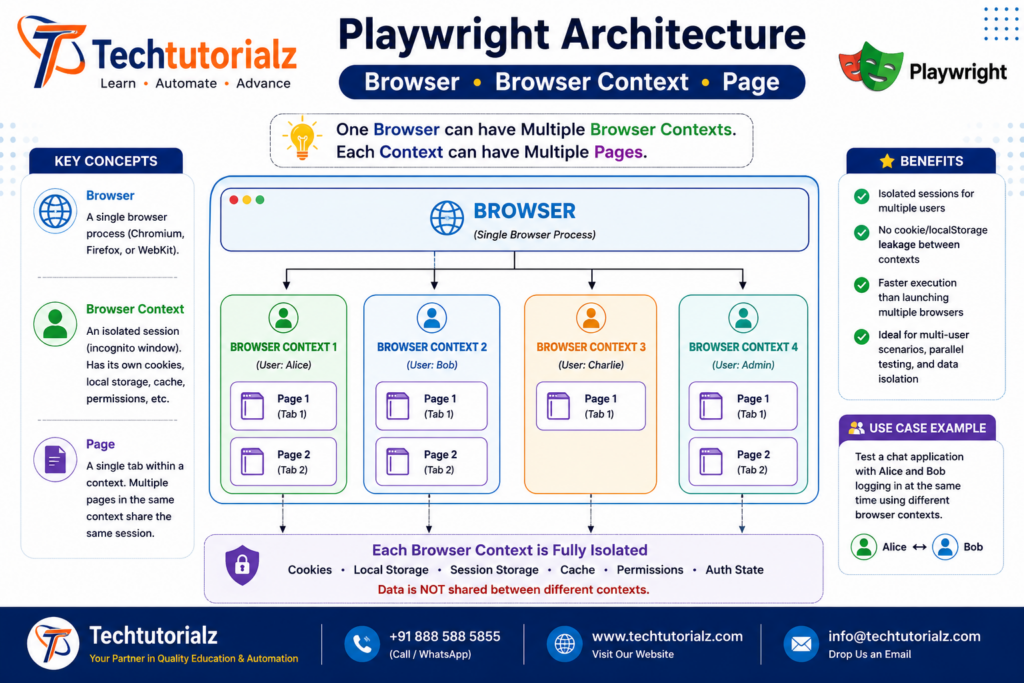
Browser vs Browser Context
- Browser → A single browser process (Chromium, Firefox, or WebKit).
- Browser Context → An isolated browser session, similar to an incognito/private window.
Each browser context has its own:
- Cookies
- Local Storage
- Session Storage
- Cache
- Permissions
- Authentication state
Contexts do not share data unless you explicitly configure them to.
Architecture
Browser
│
├── BrowserContext 1
│ ├── Page 1
│ ├── Page 2
│
├── BrowserContext 2
│ ├── Page 1
│ ├── Page 2
│
├── BrowserContext 3
│ └── Page 1
│
└── BrowserContext 4
├── Page 1
└── Page 2
Example
import { chromium } from ‘@playwright/test’;
async function demo() {
const browser = await chromium.launch();
// Context for User 1
const context1 = await browser.newContext();
const page1 = await context1.newPage();
await page1.goto(‘https://example.com’);
// Context for User 2
const context2 = await browser.newContext();
const page2 = await context2.newPage();
await page2.goto(‘https://example.com’);
console.log(context1 === context2); // false
await browser.close();
}
demo();
Real-Time Example
Suppose you want to test a chat application.
Browser
│
├── Context 1 → Alice
│
└── Context 2 → Bob
const browser = await chromium.launch();
const aliceContext = await browser.newContext();
const alicePage = await aliceContext.newPage();
const bobContext = await browser.newContext();
const bobPage = await bobContext.newPage();
Now Alice and Bob can log in with different accounts without affecting each other’s cookies or sessions.
Multiple Pages in the Same Context
Pages inside the same context share the same session.
const context = await browser.newContext();
const page1 = await context.newPage();
const page2 = await context.newPage();
If you log in using page1, page2 is already logged in because both share the same cookies and storage.
Different Contexts
const context1 = await browser.newContext();
const context2 = await browser.newContext();
Logging into context1 does not log you into context2.
Interview Question
Q: Can one browser have multiple browser contexts in Playwright?
Answer:
Yes. A single browser instance can contain multiple browser contexts. Each browser context is an isolated session with its own cookies, local storage, session storage, and cache. This allows testing multiple users or independent sessions efficiently without launching multiple browser processes.
Best Practice
- Use multiple browser contexts to simulate different users (e.g., Admin vs Customer).
- Use multiple pages in the same context when the pages should share the same login/session.
- Prefer multiple contexts over multiple browser instances because contexts are much faster and consume fewer resources.
Summary
| Component | Can have multiple? | Shares Session? |
| Browser | ✅ Multiple Contexts | N/A |
| Browser Context | ✅ Multiple Pages | Yes |
| Page | ❌ No child objects | Same as its context |
A common hierarchy in Playwright is:
Browser
├── Context 1
│ ├── Page 1
│ └── Page 2
│
├── Context 2
│ ├── Page 1
│ └── Page 2
│
└── Context 3
└── Page 1
This design makes Playwright ideal for testing multiple independent users efficiently within a single browser process.


