- Jul 06, 2026
- admin
- 0
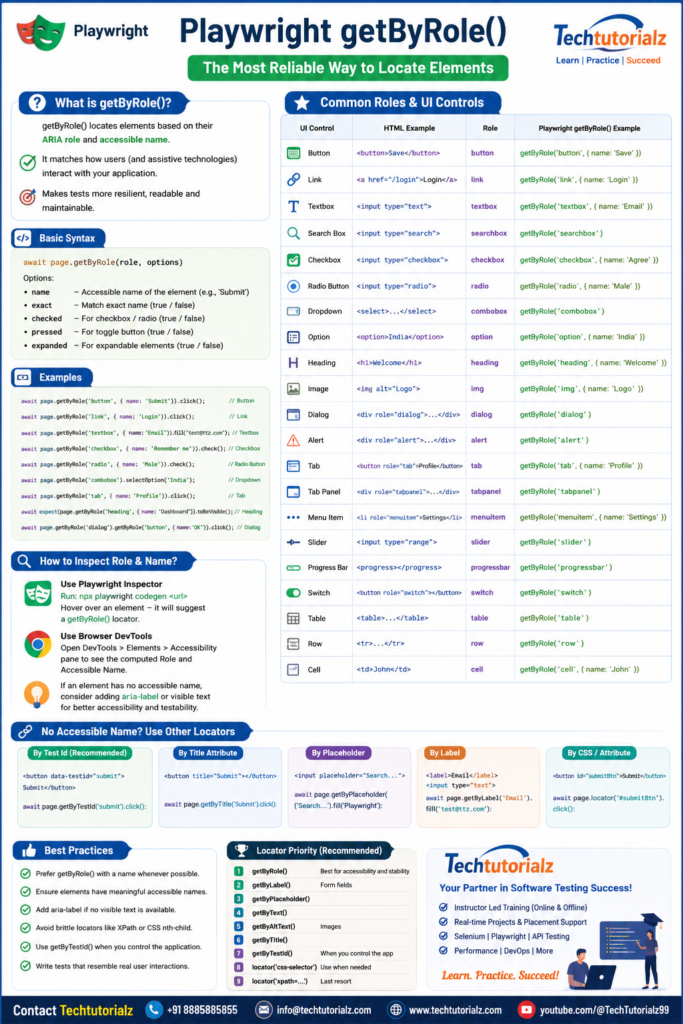
Which attributes can Playwright use?
| Locator | Uses |
| getByRole() | Accessible role + accessible name |
| getByLabel() | Associated <label> text |
| getByPlaceholder() | placeholder attribute |
| getByAltText() | alt attribute |
| getByTitle() | title attribute |
| getByTestId() | data-testid (or configured test ID attribute) |
| locator() | Any CSS selector (id, class, name, value, data-*, etc.) |
| locator(‘xpath=…’) | Any XPath expression |
Rule of thumb: Use getByRole() whenever the element has a meaningful accessible name. If you need to locate by arbitrary HTML attributes such as id, name, value, class, or data-*, use locator() (or getByTestId() for dedicated test IDs).
Locator Priority (Recommended)
- ✅ getByRole() — Best for accessibility and stability.
- ✅ getByLabel() — Form fields.
- ✅ getByPlaceholder()
- ✅ getByText()
- ✅ getByAltText() — Images.
- ✅ getByTitle()
- ✅ getByTestId() — When you control the application’s markup.
- ⚠️ locator(‘css-selector’) — Use when semantic locators are not available.
- ⚠️ locator(‘xpath=…’) — Prefer only as a last resort.
Common Roles and UI Controls
| UI Control | HTML Example | Role | Playwright |
| Button | <button>Save</button> | button | page.getByRole(‘button’, { name: ‘Save’ }) |
| Link | <a href=”/login”>Login</a> | link | page.getByRole(‘link’, { name: ‘Login’ }) |
| Textbox | <input type=”text”> | textbox | page.getByRole(‘textbox’) |
| Password | <input type=”password”> | textbox | page.getByLabel(‘Password’) (recommended) |
| Search Box | <input type=”search”> | searchbox | page.getByRole(‘searchbox’) |
| Checkbox | <input type=”checkbox”> | checkbox | page.getByRole(‘checkbox’, { name: ‘Remember me’ }) |
| Radio Button | <input type=”radio”> | radio | page.getByRole(‘radio’, { name: ‘Male’ }) |
| Combo Box | <select> | combobox | page.getByRole(‘combobox’) |
| List Box | <select multiple> | listbox | page.getByRole(‘listbox’) |
| Option | <option> | option | page.getByRole(‘option’, { name: ‘India’ }) |
| Menu | <ul role=”menu”> | menu | page.getByRole(‘menu’) |
| Menu Item | <li role=”menuitem”> | menuitem | page.getByRole(‘menuitem’, { name: ‘Settings’ }) |
| Tab | <button role=”tab”> | tab | page.getByRole(‘tab’, { name: ‘Profile’ }) |
| Tab Panel | <div role=”tabpanel”> | tabpanel | page.getByRole(‘tabpanel’) |
| Dialog | <dialog> | dialog | page.getByRole(‘dialog’) |
| Alert | <div role=”alert”> | alert | page.getByRole(‘alert’) |
| Slider | <input type=”range”> | slider | page.getByRole(‘slider’) |
| Progress Bar | <progress> | progressbar | page.getByRole(‘progressbar’) |
| Heading | <h1>–<h6> | heading | page.getByRole(‘heading’, { name: ‘Welcome’ }) |
| Image | <img alt=”Logo”> | img | page.getByRole(‘img’, { name: ‘Logo’ }) |
| Table | <table> | table | page.getByRole(‘table’) |
| Row | <tr> | row | page.getByRole(‘row’) |
| Cell | <td> | cell | page.getByRole(‘cell’, { name: ‘John’ }) |
| Grid | <table role=”grid”> | grid | page.getByRole(‘grid’) |
| Tree | <ul role=”tree”> | tree | page.getByRole(‘tree’) |
| Tree Item | <li role=”treeitem”> | treeitem | page.getByRole(‘treeitem’, { name: ‘Documents’ }) |
| Switch | <button role=”switch”> | switch | page.getByRole(‘switch’) |
| Spin Button | <input type=”number”> | spinbutton | page.getByRole(‘spinbutton’) |