
- Jul 14, 2026
- admin
- 0
How AI can help in Playwright automation
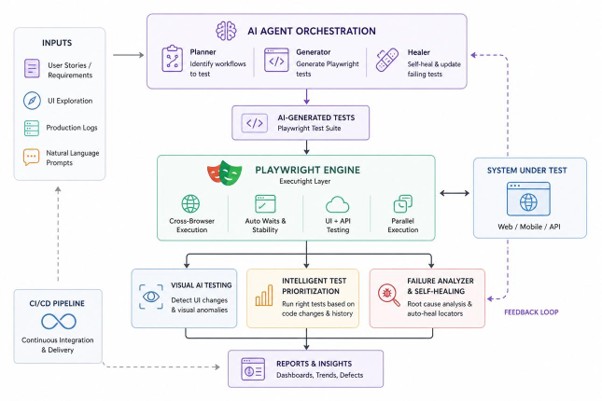
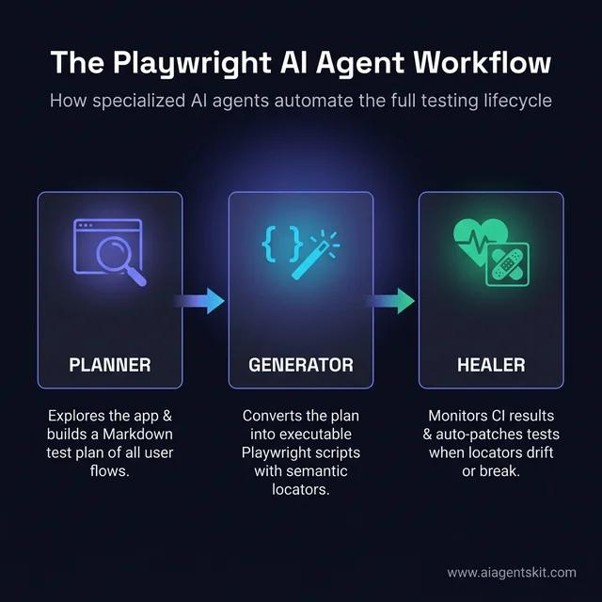
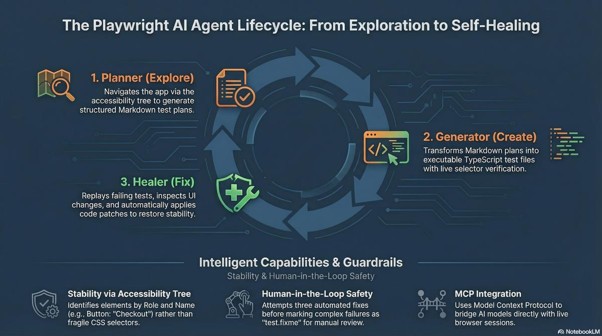
AI can help Playwright automation far beyond just generating test scripts. The biggest opportunity is to use AI across the entire automation lifecycle:
- AI-generated test cases
Give AI a requirement:
“User should be able to login with valid and invalid credentials.”
AI can generate:
- Positive scenarios
- Negative scenarios
- Boundary cases
- Validation scenarios
- Security-related scenarios
- Playwright test skeletons
Requirement
↓
AI
↓
Test Scenarios
↓
Playwright Tests
- AI-generated Playwright code
AI can convert a test scenario into TypeScript/JavaScript:
await page.getByLabel(‘Username’).fill(‘admin’);
await page.getByLabel(‘Password’).fill(‘password’);
await page.getByRole(‘button’, { name: ‘Login’ }).click();
await expect(page.getByText(‘Dashboard’)).toBeVisible();
It can also explain existing Playwright code and suggest improvements.
- AI locator assistance
This is particularly useful when locators fail.
For example:
getByRole(‘button’, { name: ‘Submit’ })
fails because the UI changed.
AI can inspect the DOM and suggest alternatives such as:
page.getByTestId(‘submit-button’)
or another robust locator.
The important concept is not blindly letting AI choose any locator. You want AI to prioritize stable locators and Playwright best practices.
- AI-powered debugging
This is one of the highest-value use cases.
When a test fails:
Playwright failure
↓
Trace
Screenshot
DOM
Console
Network
Test source
↓
AI
↓
Root-cause analysis
↓
Suggested fix
Instead of:
TimeoutError: locator.click()
AI could determine:
The locator is correct, but the button isn’t rendered because the /api/user/profile request returned HTTP 500.
That’s a much more useful debugging capability.
- AI analysis of Trace Viewer
Playwright traces contain a lot of information.
AI can help analyze:
- Failed action
- Previous actions
- DOM state
- Network activity
- Console errors
- Timing
- Screenshots
and answer:
Why did this test fail?
This is an excellent advanced topic for your Techtutorialz curriculum.
- AI flaky-test detection
Suppose a test passes 95 times and fails 5 times.
AI can analyze historical executions and identify patterns such as:
Failure occurs mostly:
- in CI
- with 4+ workers
- after API response > 5 sec
- on Chromium
- during parallel execution
It can then suggest:
- Missing synchronization
- Race condition
- Bad test isolation
- Environment problem
- Network dependency
- Incorrect timeout
- AI test maintenance
UI changes frequently.
For example:
Old:
getByRole(‘button’, { name: ‘Submit’ })
Application change
New:
getByRole(‘button’, { name: ‘Save & Continue’ })
AI can identify the change and suggest the corresponding test update.
This leads toward AI-assisted self-healing automation.
- AI-generated test data
AI can generate realistic:
- Customer data
- Addresses
- Products
- Invalid inputs
- Boundary values
- International data
- Large datasets
For example:
Generate 100 customer records
with:
name
phone
address
date of birth
Then Playwright can consume the generated data.
- AI API + UI testing
Playwright isn’t limited to UI.
You can combine AI with:
API Testing
+
Database Validation
+
UI Automation
+
AI Analysis
For example:
Create customer through API
↓
Verify database
↓
Login through UI
↓
Verify customer
↓
AI analyzes failures
This is much closer to enterprise automation.
- AI-generated assertions
AI can analyze a requirement and suggest assertions.
Requirement:
After placing an order, the user should see the order confirmation with the correct order number and amount.
AI could suggest:
await expect(page.getByText(‘Order Confirmed’)).toBeVisible();
await expect(page.getByTestId(‘order-number’)).toHaveText(orderNumber);
await expect(page.getByTestId(‘order-total’)).toHaveText(‘$199.99’);
- AI security testing
AI can also help generate security-oriented test scenarios.
For example:
Login
↓
AI generates:
- invalid credentials
- SQL injection strings
- XSS payload scenarios
- session timeout scenarios
- unauthorized access
- privilege escalation scenarios
The actual security testing still needs controlled, appropriate validation; AI is primarily helping with scenario generation and analysis.
- AI + CI/CD
This is another major opportunity.
Imagine an Azure DevOps pipeline:
Build
↓
Playwright Tests
↓
Failure
↓
Collect:
Trace
Screenshot
Video
Logs
Network
↓
AI
↓
Classify failure
↓
Application bug
Test bug
Environment issue
Flaky test
↓
Generate report
Instead of a QA engineer spending 30 minutes investigating every failure, AI can provide an initial diagnosis.
- AI agents + Playwright
This is where things become much more advanced.
An AI agent can potentially perform a workflow such as:
“Run the login regression tests
and investigate any failures.”
The agent:
Run Playwright
↓
Detect failure
↓
Inspect trace
↓
Inspect screenshot
↓
Inspect DOM
↓
Inspect console
↓
Inspect API
↓
Determine root cause
↓
Suggest/implement fix
↓
Run test again
↓
Report result
This is where MCP + Playwright + AI agents becomes particularly interesting.
- AI + MCP + Playwright
For your Techtutorialz content, I think this is one of the strongest areas to develop.
You can teach:
Playwright MCP Server
↓
AI Agent
↓
Playwright tools
↓
Browser
For example:
User
│
│ “Debug login test”
↓
AI Agent
│
├── run_test()
├── open_browser()
├── inspect_page()
├── take_screenshot()
├── get_console_logs()
└── inspect_network()
│
↓
Playwright
│
↓
Browser
The AI isn’t merely writing Playwright code.
It is using Playwright as a tool.
That’s a much more advanced concept.


