
- Jul 14, 2026
- admin
- 0
AI Self-Healing Concepts in Playwright Automation
AI self-healing is the ability of a test automation framework to automatically recover from UI changes (such as changed locators, renamed buttons, or moved elements) without requiring manual updates to the test script.
Unlike traditional automation, AI-based frameworks use machine learning, DOM analysis, and heuristics to identify the intended element even when the original locator no longer works.
Traditional Playwright vs AI Self-Healing
| Traditional Playwright | AI Self-Healing |
| Uses fixed locators | Uses multiple signals to identify elements |
| Test fails if locator changes | Attempts alternative ways to locate the element |
| Manual maintenance required | Automatically adapts to UI changes |
| Predictable behavior | Intelligent recovery based on context |
Example Scenario
Original HTML
<button id=”loginBtn”>Login</button>
Playwright Test
await page.locator(‘#loginBtn’).click();
Everything works.
UI Changed
Developer changes HTML
<button id=”signinBtn”>Login</button>
Traditional Playwright
Timeout Error
Locator ‘#loginBtn’ not found
Test fails.
AI Self-Healing
The framework notices
- Button text still says “Login”
- Button position is same
- Button role is same
- Parent container unchanged
Instead of failing, it tries
getByRole(‘button’, { name: ‘Login’ })
or
button:has-text(“Login”)
Test continues successfully.
How AI Self-Healing Works
Test Starts
│
▼
Primary Locator
│
▼
Element Found?
│
┌────┴────┐
│ │
Yes No
│ │
▼ ▼
Continue Analyze DOM
│
▼
Compare Similar Elements
│
▼
AI Confidence Score
│
┌────────┴─────────┐
│ │
High Confidence Low Confidence
│ │
▼ ▼
Continue Fail Test
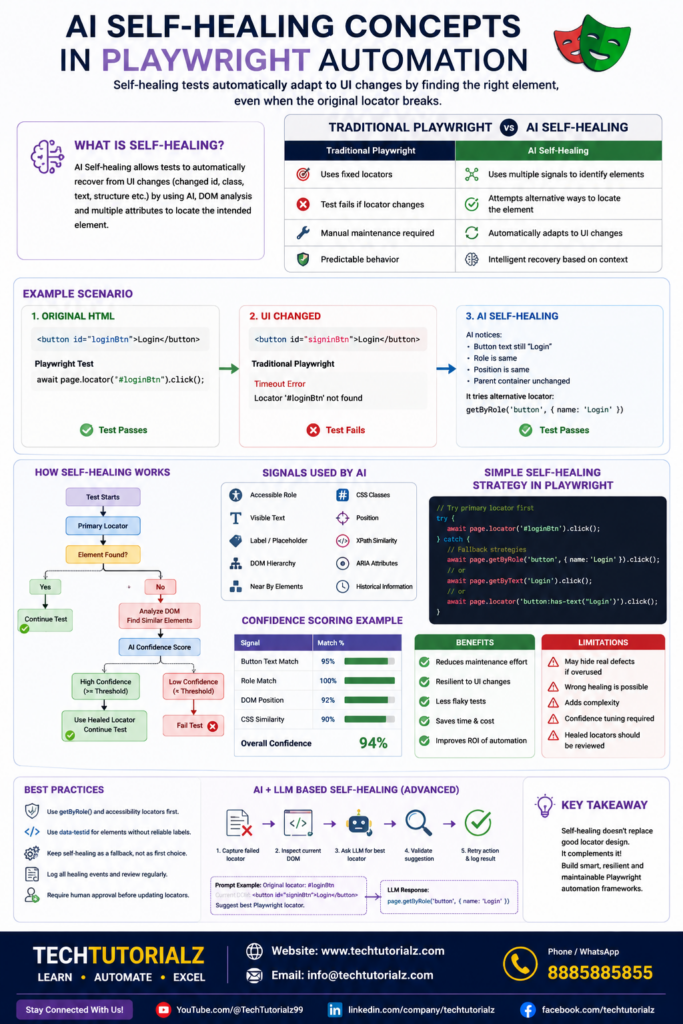
Signals Used by AI
Instead of relying on one locator, AI considers multiple attributes:
- Accessible role
- Visible text
- Label
- Placeholder
- Nearby elements
- DOM hierarchy
- CSS classes
- Position
- XPath similarity
- Historical locator information
- ARIA attributes
Example
Original
<button id=”submitBtn”>Submit Order</button>
Changed
<button id=”checkoutBtn”>Submit Order</button>
AI notices
- Same role
- Same text
- Same location
and successfully maps the new element.
Confidence Scoring
AI generally assigns a confidence score before healing.
Example
Button Text Match 95%
Role Match 100%
DOM Position 92%
CSS Similarity 90%
Overall Confidence 94%
If the confidence exceeds a configured threshold (for example, 90%), the test proceeds using the healed locator.
Can Playwright Do Self-Healing Natively?
No.
Playwright intentionally does not include AI self-healing. The Playwright team encourages using stable, user-facing locators (such as getByRole, getByLabel, and getByTestId) instead of masking UI changes with automatic healing.
However, Playwright already reduces locator brittleness through:
- Auto-waiting
- Strict locators
- Accessibility-first locators
- getByRole()
- getByLabel()
- getByPlaceholder()
- getByTestId()
- Locator chaining
- Retry mechanisms
These practices often eliminate many failures that self-healing tools try to address.
Building a Simple Self-Healing Layer in Playwright
You can implement a fallback strategy yourself.
try {
await page.locator(‘#loginBtn’).click();
}
catch {
console.log(“Primary locator failed”);
await page
.getByRole(‘button’, { name: ‘Login’ })
.click();
}
A reusable helper:
async function clickLogin(page) {
const strategies = [
() => page.locator(‘#loginBtn’),
() => page.getByRole(‘button’, { name: ‘Login’ }),
() => page.getByText(‘Login’),
() => page.locator(‘button:has-text(“Login”)’)
];
for (const strategy of strategies) {
try {
const locator = strategy();
await locator.waitFor({ timeout: 1000 });
await locator.click();
return;
} catch {
// Try the next strategy
}
}
throw new Error(“Unable to locate Login button”);
}
AI + LLM-Based Self-Healing
Modern AI-powered systems can go further by:
- Capturing the failed locator.
- Inspecting the current DOM.
- Asking an LLM to suggest a replacement locator.
- Validating the suggestion.
- Retrying the action.
- Logging the healed locator for review.
Example prompt:
Original locator:
#loginBtn
Current DOM:
<button id=”signinBtn”>Login</button>
Suggest the best Playwright locator.
LLM response:
page.getByRole(‘button’, { name: ‘Login’ })
This approach combines semantic understanding with Playwright’s locator APIs.
Benefits
- Reduced maintenance effort
- Greater resilience to minor UI changes
- Faster CI/CD execution with fewer false failures
- Improved productivity for QA teams
- Better return on automation investment
Limitations
- Can hide genuine UI regressions if overused
- Incorrect healing may interact with the wrong element
- Adds complexity and execution overhead
- Confidence thresholds must be tuned carefully
- Healed locators should be reviewed rather than accepted blindly
Best Practices
- Prefer getByRole() and other accessibility-based locators before considering self-healing.
- Use data-testid for elements without reliable accessible names.
- Treat self-healing as a fallback, not a replacement for good locator design.
- Log every healing event and review it regularly.
- Require human approval before permanently updating locators.
Playwright Interview Questions1
Playwright Interview Questions2
Playwright Interview Questions3


