
- Jul 13, 2026
- admin
- 0
Codegen in Playwright
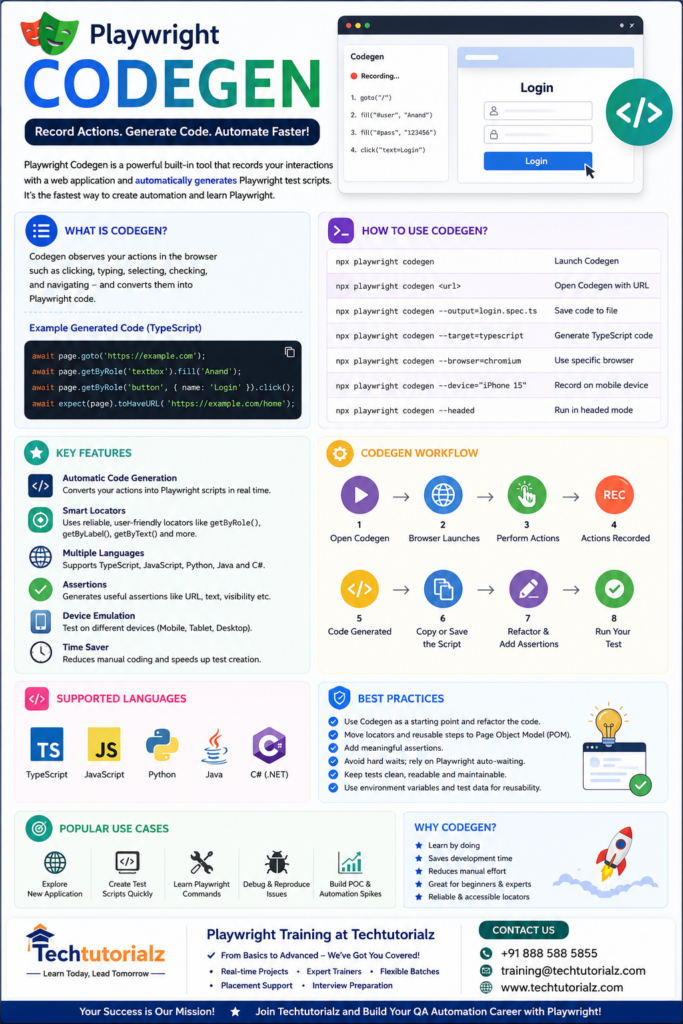
Playwright Codegen is a built-in tool that records your interactions with a web application and automatically generates Playwright test scripts. It is one of the fastest ways to learn Playwright and create test automation.
What is Codegen?
Codegen observes your actions in the browser, such as:
- Clicking buttons
- Entering text
- Selecting dropdown values
- Checking checkboxes
- Navigating between pages
It converts these actions into Playwright code.
For example:
await page.goto(‘https://demo.playwright.dev/’);
await page.getByRole(‘textbox’).fill(‘Anand’);
await page.getByRole(‘button’, { name: ‘Submit’ }).click();
Benefits of Codegen
- Saves development time
- Automatically generates reliable locators
- Helps beginners learn Playwright syntax
- Supports multiple programming languages
- Great starting point for automation scripts
- Generates accessibility-friendly locators (getByRole, getByLabel, etc.)
Basic Syntax
npx playwright codegen
This command launches:
- A browser
- Playwright Inspector
- Code generation window
Every action you perform is converted into code.
Open a Specific Website
npx playwright codegen https://opensource-demo.orangehrmlive.com/
or
npx playwright codegen https://www.saucedemo.com/
Generate TypeScript Code
npx playwright codegen –target=typescript
Example output:
import { test, expect } from ‘@playwright/test’;
test(‘test’, async ({ page }) => {
await page.goto(‘https://www.saucedemo.com/’);
await page.getByPlaceholder(‘Username’).fill(‘standard_user’);
await page.getByPlaceholder(‘Password’).fill(‘secret_sauce’);
await page.getByRole(‘button’, { name: ‘Login’ }).click();
});
Generate JavaScript Code
npx playwright codegen –target=javascript
Generate Python Code
npx playwright codegen –target=python
Generate Java Code
npx playwright codegen –target=java
Generate C# Code
npx playwright codegen –target=dotnet
Save Generated Script
npx playwright codegen –output=login.spec.ts
Now all recorded actions are saved automatically into login.spec.ts.
Record on a Mobile Device
npx playwright codegen –device=”iPhone 15″
Other examples:
- Pixel 7
- Galaxy S24
- iPad Pro
Record in Chromium
npx playwright codegen –browser=chromium
Record in Firefox
npx playwright codegen –browser=firefox
Record in WebKit
npx playwright codegen –browser=webkit
Record in Headed Mode
npx playwright codegen –headed
Ignore HTTPS Errors
Useful for internal applications.
npx playwright codegen –ignore-https-errors
Generate Assertions
Codegen can generate assertions while recording.
Examples include:
await expect(page).toHaveURL(‘https://example.com’);
await expect(page.getByText(‘Welcome’)).toBeVisible();
await expect(page.locator(‘#message’)).toContainText(‘Success’);
Improve Generated Locators
Playwright prefers stable locators in this order:
- getByRole()
- getByLabel()
- getByPlaceholder()
- getByText()
- getByTestId()
- CSS selectors
- XPath (least preferred)
Example:
await page.getByRole(‘button’, { name: ‘Login’ }).click();
instead of
await page.locator(‘#loginBtn’).click();
Codegen Workflow
Open Codegen
↓
Launch Browser
↓
Perform Actions
↓
Playwright Records Actions
↓
Generated Script Appears
↓
Copy or Save the Script
↓
Refactor Using POM
↓
Run the Test
Real-Time Example
Record a login test:
npx playwright codegen https://www.saucedemo.com/
Perform:
- Enter username
- Enter password
- Click Login
Generated code:
import { test, expect } from ‘@playwright/test’;
test(‘SauceDemo Login’, async ({ page }) => {
await page.goto(‘https://www.saucedemo.com/’);
await page.getByPlaceholder(‘Username’).fill(‘standard_user’);
await page.getByPlaceholder(‘Password’).fill(‘secret_sauce’);
await page.getByRole(‘button’, { name: ‘Login’ }).click();
await expect(page.locator(‘.title’)).toContainText(‘Products’);
});
Best Practices
- Use Codegen as a starting point, then refactor the generated code.
- Move reusable locators into a Page Object Model (POM).
- Replace duplicated steps with helper methods or fixtures.
- Remove unnecessary goto() calls when appropriate.
- Add meaningful assertions after key actions.
- Avoid editing generated code only to change formatting—focus on readability and maintainability.
Common Interview Questions
- What is Codegen in Playwright?
A built-in recorder that generates Playwright automation code based on user interactions with the browser. - Does Codegen support multiple languages?
Yes. It supports TypeScript, JavaScript, Python, Java, and C#. - Can Codegen generate assertions?
Yes, it can generate assertions such as URL, visibility, and text checks while recording. - Should Codegen-generated code be used directly in production?
Usually no. It is best used as a starting point and then refactored to follow your project’s coding standards and framework design. - What are the advantages of Codegen?
- Speeds up script creation
- Helps beginners learn Playwright APIs
- Produces robust, accessibility-focused locators
- Reduces manual coding effort
- Useful for quickly exploring and automating new applications
This topic is an excellent addition to your TechTutorialz Playwright series because it’s highly searched by beginners and experienced automation engineers alike.
Master Playwright from Scratch! Explore our complete Playwright Tutorial collection covering:
- Playwright Basics
- Locators
- Assertions
- Timeouts
- Browser Context
- Frames & iFrames
- Auto Waiting & Timeouts
- API Testing
- Network Interception
- Authentication
- Fixtures
- Parallel Execution
- CI/CD
- AI in Playwright
👉 Browse all Playwright tutorials: Playwright Tutorial


