
- Jul 13, 2026
- admin
- 0
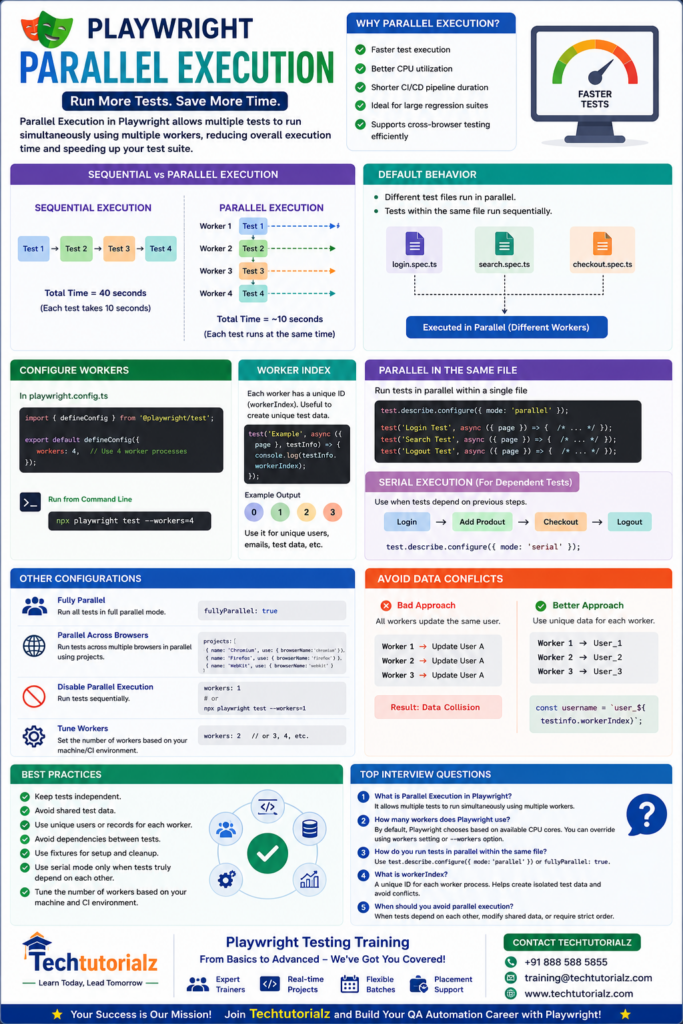
Parallel Execution in Playwright
Parallel Execution is one of Playwright’s most powerful features. It allows multiple tests to run simultaneously across different worker processes, significantly reducing the total execution time of your test suite.
What is Parallel Execution?
Instead of running tests one after another (sequentially), Playwright can execute multiple tests at the same time.
Sequential Execution
Test 1 → Test 2 → Test 3 → Test 4
Total Time = 40 seconds (assuming each test takes 10 seconds)
Parallel Execution
Worker 1 : Test 1 ─────────►
Worker 2 : Test 2 ─────────►
Worker 3 : Test 3 ─────────►
Worker 4 : Test 4 ─────────►
Total Time = ~10 seconds
Benefits
- Faster test execution
- Better CPU utilization
- Shorter CI/CD pipeline duration
- Ideal for large regression suites
- Supports cross-browser testing efficiently
Default Behavior
By default:
- Different test files run in parallel.
- Tests within the same file run sequentially.
Example:
login.spec.ts
search.spec.ts
checkout.spec.ts
Playwright may execute all three files at the same time using separate workers.
Configure Workers
In playwright.config.ts:
import { defineConfig } from ‘@playwright/test’;
export default defineConfig({
workers: 4,
});
This allows Playwright to use 4 worker processes.
Run Tests with Workers
npx playwright test –workers=4
Run Tests Fully Parallel
import { defineConfig } from ‘@playwright/test’;
export default defineConfig({
fullyParallel: true,
});
Now even tests within the same file can run in parallel (when safe to do so).
Parallel Execution Within a Test File
import { test, expect } from ‘@playwright/test’;
test.describe.configure({ mode: ‘parallel’ });
test(‘Login Test’, async ({ page }) => {
// Test Code
});
test(‘Search Test’, async ({ page }) => {
// Test Code
});
test(‘Logout Test’, async ({ page }) => {
// Test Code
});
Each test can execute simultaneously.
Avoid Data Conflicts
Bad example:
All workers update the same user.
Worker 1 → Update User A
Worker 2 → Update User A
Worker 3 → Update User A
Result:
❌ Data collision
Better approach:
Worker 1 → User_1
Worker 2 → User_2
Worker 3 → User_3
Example:
const username = `user_${testInfo.workerIndex}`;
Disable Parallel Execution
workers: 1
or
npx playwright test –workers=1
Parallel Across Browsers
projects: [
{
name: ‘Chromium’,
use: { browserName: ‘chromium’ }
},
{
name: ‘Firefox’,
use: { browserName: ‘firefox’ }
},
{
name: ‘WebKit’,
use: { browserName: ‘webkit’ }
}
]
Playwright can execute tests across multiple browsers in parallel.
Best Practices
- Keep tests independent.
- Avoid shared test data.
- Use unique users or records for each worker.
- Avoid dependencies between tests.
- Use fixtures for setup and cleanup.
- Use serial mode only when tests truly depend on each other.
- Tune the number of workers based on your machine and CI environment.
Common Interview Questions
- What is Parallel Execution in Playwright?
It allows multiple tests to run simultaneously using multiple worker processes, reducing overall execution time.
- How many workers does Playwright use?
By default, Playwright chooses a worker count based on the available CPU cores. You can override it with the workers setting or the –workers command-line option.
- How do you run tests in parallel within the same file?
test.describe.configure({
mode: ‘parallel’
});
or enable:
fullyParallel: true
- What is workerIndex?
workerIndex is the unique identifier assigned to each worker process. It helps create isolated test data and avoid conflicts during parallel execution.
- When should you avoid parallel execution?
Avoid it when tests:
- Depend on the results of other tests.
- Modify the same shared data.
- Require a strict execution order.
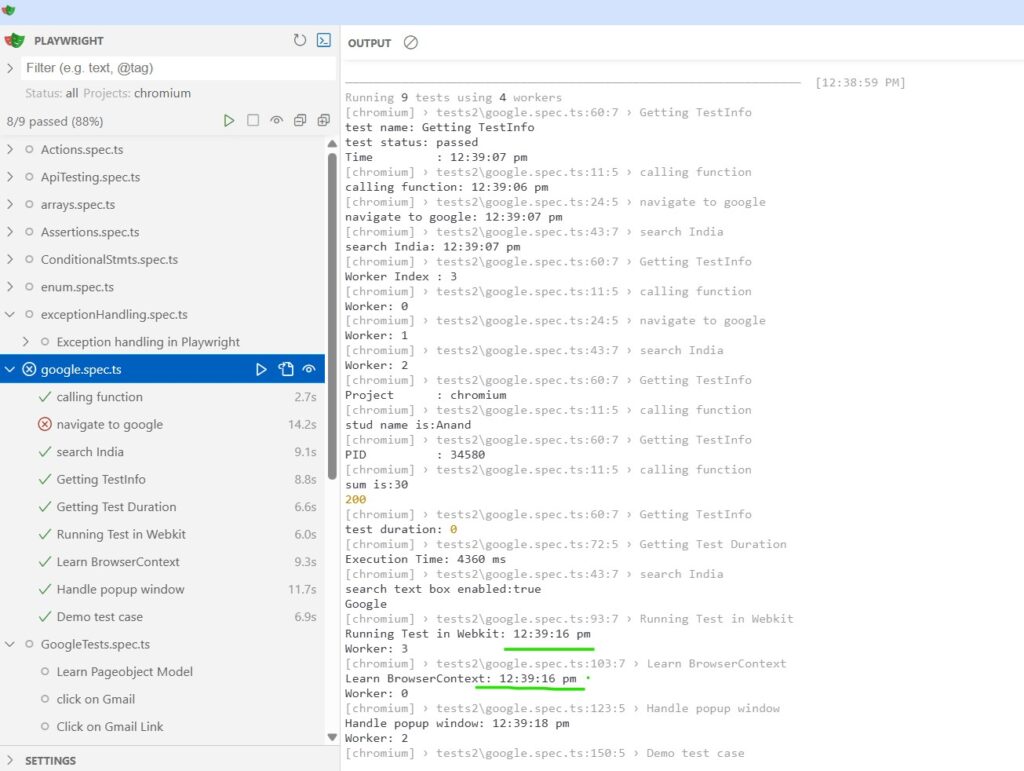
Sample test cases with Paralell execution
Master Playwright from Scratch! Explore our complete Playwright Tutorial collection covering:
- Playwright Basics
- Locators
- Assertions
- Timeouts
- Browser Context
- Frames & iFrames
- Auto Waiting & Timeouts
- API Testing
- Network Interception
- Authentication
- Fixtures
- Parallel Execution
- CI/CD
- AI in Playwright
👉 Browse all Playwright tutorials: Playwright Tutorial


