- Jul 09, 2026
- admin
- 0
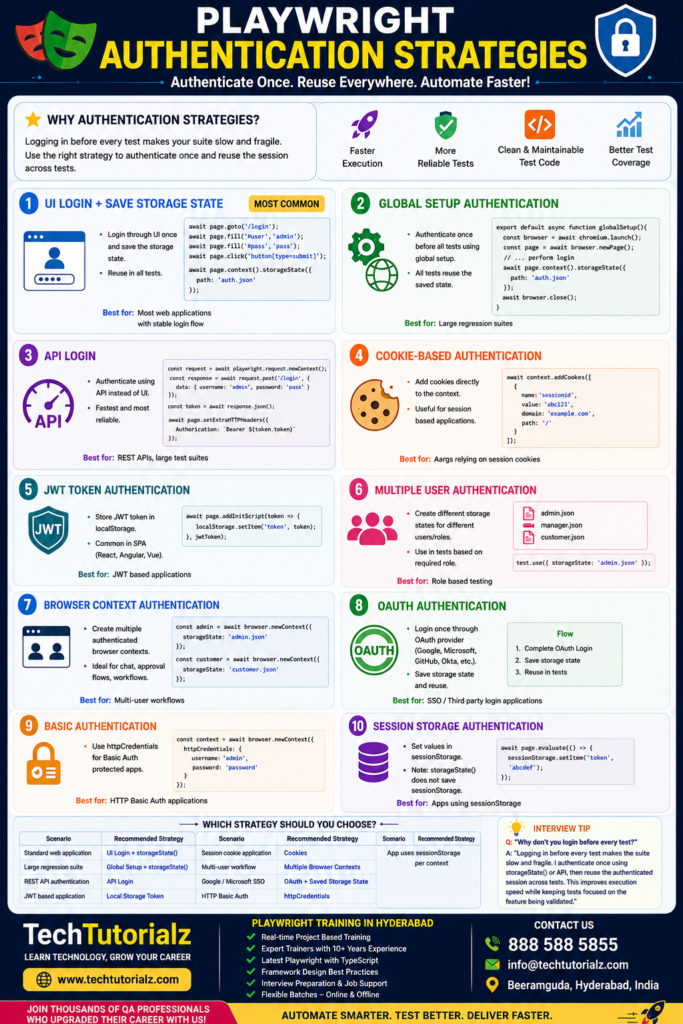
Authentication Strategies in Playwright
Authentication is one of the most important Playwright interview topics. Companies almost never ask you to automate the login page in every test—they expect you to authenticate once and reuse the session.
Here are the major authentication strategies in Playwright.
- UI Login + Save Storage State ⭐⭐⭐⭐⭐ (Most Common)
Log in once through the UI and save the authentication state.
import { test } from ‘@playwright/test’;
test(‘Login and save authentication’, async ({ page }) => {
await page.goto(‘https://example.com/login’);
await page.fill(‘#username’, ‘admin’);
await page.fill(‘#password’, ‘password’);
await page.click(‘button[type=submit]’);
await page.context().storageState({
path: ‘auth.json’
});
});
Use it in your tests:
import { test } from ‘@playwright/test’;
test.use({
storageState: ‘auth.json’
});
test(‘Dashboard’, async ({ page }) => {
await page.goto(‘https://example.com/dashboard’);
});
Best for:
- Most web applications
- Stable login flows
- Global Setup Authentication ⭐⭐⭐⭐⭐
Authenticate once before all tests.
playwright.config.ts
export default defineConfig({
globalSetup: ‘./global-setup.ts’
});
global-setup.ts
import { chromium } from ‘@playwright/test’;
async function globalSetup() {
const browser = await chromium.launch();
const page = await browser.newPage();
await page.goto(‘https://example.com/login’);
await page.fill(‘#username’, ‘admin’);
await page.fill(‘#password’, ‘password’);
await page.click(‘button[type=submit]’);
await page.context().storageState({
path: ‘auth.json’
});
await browser.close();
}
export default globalSetup;
All tests reuse auth.json.
Advantages
- Faster execution
- No repeated logins
- Great for regression suites
- API Login ⭐⭐⭐⭐⭐ (Fastest)
Authenticate using an API instead of the UI.
import { request } from ‘@playwright/test’;
const context = await request.newContext();
const response = await context.post(‘/login’, {
data: {
username: ‘admin’,
password: ‘password’
}
});
const token = await response.json();
Then use the token:
await page.setExtraHTTPHeaders({
Authorization: `Bearer ${token.accessToken}`
});
Best for
- REST APIs
- Modern applications
- Large test suites
- Cookie-Based Authentication
Inject cookies directly.
await context.addCookies([
{
name: ‘sessionid’,
value: ‘abc123’,
domain: ‘example.com’,
path: ‘/’
}
]);
Useful when the application relies primarily on session cookies.
- JWT Token Authentication
Store a JWT in local storage.
await page.addInitScript(token => {
localStorage.setItem(‘token’, token);
}, jwtToken);
Very common in React, Angular, and Vue applications.
- Multiple User Authentication
Create different storage states.
admin.json
manager.json
customer.json
Use them like this:
test.use({
storageState: ‘admin.json’
});
Great for role-based testing.
- Browser Context Authentication
Create multiple authenticated contexts.
const admin = await browser.newContext({
storageState: ‘admin.json’
});
const customer = await browser.newContext({
storageState: ‘customer.json’
});
Ideal for chat applications, approvals, and workflow testing.
- OAuth Authentication
For providers like Google, Microsoft, GitHub, or Okta:
- Complete the OAuth login once.
- Save the storage state.
- Reuse it in future tests.
Avoid automating third-party login pages repeatedly, as they often include CAPTCHAs and additional security checks.
- Basic Authentication
const context = await browser.newContext({
httpCredentials: {
username: ‘admin’,
password: ‘password’
}
});
Suitable for applications protected by HTTP Basic Authentication.
- Session Storage Authentication
Some applications keep authentication data in sessionStorage.
await page.evaluate(() => {
sessionStorage.setItem(‘token’, ‘abcdef’);
});
Remember that storageState() saves cookies and localStorage, but not sessionStorage, so you’ll need to recreate session storage for each new context if your app depends on it.
Which strategy should you choose?
| Scenario | Recommended Strategy |
| Standard web application | UI Login + storageState() |
| Large regression suite | Global Setup + storageState() |
| REST API authentication | API Login |
| JWT-based application | Local Storage Token |
| Session cookie application | Cookies |
| Multi-user workflow | Multiple Browser Contexts |
| Google/Microsoft SSO | OAuth + Saved Storage State |
| HTTP Basic Auth | httpCredentials |
| App uses sessionStorage | Recreate sessionStorage per context |