
- Jul 14, 2026
- admin
- 0
AI Locators in Playwright
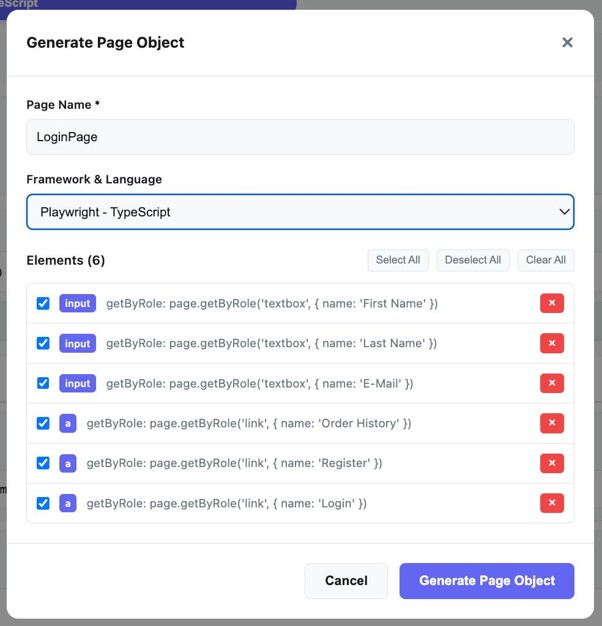
The idea is to use AI to identify the best locator for an element, rather than manually writing XPath/CSS selectors.
For example, given:
<button class=”btn-primary” data-testid=”login-btn”>
Sign In
</button>
Traditional Playwright:
await page.locator(‘#login-btn’).click();
or preferably:
await page.getByRole(‘button’, { name: ‘Sign In’ }).click();
An AI-assisted locator system could analyze the DOM and determine that:
page.getByRole(‘button’, { name: ‘Sign In’ })
is the most robust locator.
AI Locator Architecture
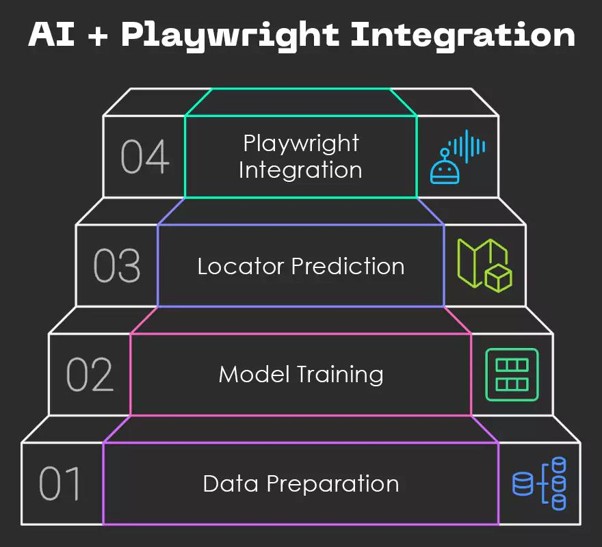
Flow:
Web Page / DOM
↓
DOM + Accessibility Information
↓
AI / LLM
↓
Analyze Candidate Elements
↓
Rank Locators
↓
Select Best Locator
↓
Playwright Test
What AI can evaluate
An AI locator engine could rank candidates based on:
| Locator | AI Assessment |
| getByRole() | ⭐⭐⭐⭐⭐ |
| getByLabel() | ⭐⭐⭐⭐⭐ |
| getByTestId() | ⭐⭐⭐⭐⭐ |
| getByText() | ⭐⭐⭐⭐ |
| CSS selector | ⭐⭐⭐ |
| XPath | ⭐⭐ |
| Dynamic XPath | ⭐ |
For example, if the AI sees:
<button
id=”btn_82931″
class=”button primary x7f82″
aria-label=”Submit Order”>
Submit
</button>
It could recommend:
await page.getByRole(‘button’, { name: ‘Submit Order’ }).click();
instead of:
await page.locator(‘#btn_82931’).click();
🔥 More advanced: AI Self-Healing Locators
This becomes even more powerful when combined with your self-healing topic.
Suppose the original test contains:
await page.getByTestId(‘login-button’).click();
The application changes and login-button disappears.
Instead of immediately failing, an AI locator engine can:
- Detect locator failure
- Inspect the current DOM
- Find similar elements
- Compare attributes/text/roles
- Ask the LLM to identify the replacement
- Execute the replacement locator
- Record the new locator
Example:
Original Locator
↓
Locator Failed
↓
Capture DOM
↓
AI analyzes candidates
↓
Finds “Sign In” button
↓
getByRole(‘button’, { name: ‘Sign In’ })
↓
Retry Test


