
- Jul 14, 2026
- admin
- 0
What does Playwright + SQL mean?
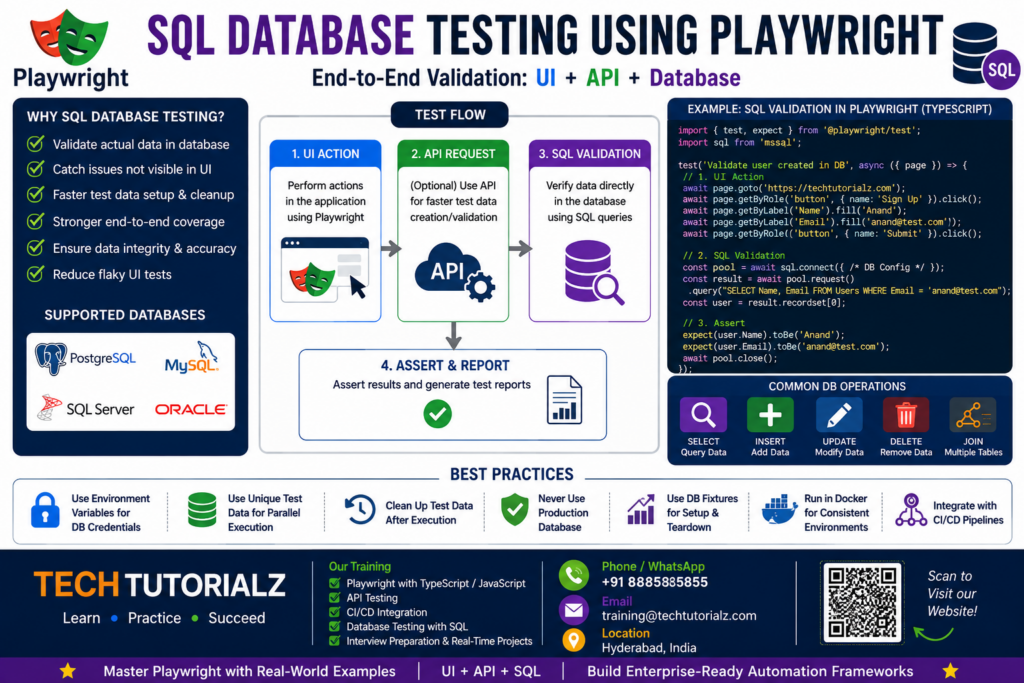
Playwright itself is primarily a browser/API automation framework. You can connect your Playwright TypeScript tests to a database using a database driver and execute SQL queries.
Typical flow:
Playwright Test
│
┌────────────┼────────────┐
↓ ↓ ↓
UI API SQL
│ │ │
↓ ↓ ↓
Browser Backend Database
│ │ │
└────────────┼────────────┘
↓
Validation
For example:
UI: Create an order
↓
API: Order is submitted
↓
SQL: Verify order exists in database
↓
SQL: Verify order status
↓
UI: Verify order displayed correctly
- Why use SQL with Playwright?
Suppose your test creates a customer:
UI:
Create Customer
Name: Anand
Email: anand@test.com
You can then validate the database:
SELECT *
FROM customers
WHERE email = ‘anand@test.com’;
Then your Playwright test can assert:
expect(customer.email).toBe(“anand@test.com”);
This gives you backend validation instead of relying only on the UI.
- Playwright + SQL architecture
A good enterprise architecture would look like:
Playwright Test
│
Test Layer
│
┌─────────┴─────────┐
│ │
Page Objects DB Utilities
│ │
↓ ↓
Browser SQL Driver
│
┌──────────────────┼───────────────┐
↓ ↓ ↓
PostgreSQL MySQL SQL Server
I would recommend keeping database code outside your Page Objects.
For example:
tests/
customer.spec.ts
pages/
CustomerPage.ts
db/
database.ts
customerQueries.ts
utils/
testData.ts
This separation makes the framework much easier to maintain.
- Connecting Playwright to SQL Server
For example, with Microsoft SQL Server you could use the mssql Node.js package.
import sql from ‘mssql’;
const config = {
user: process.env.DB_USER,
password: process.env.DB_PASSWORD,
server: process.env.DB_SERVER!,
database: process.env.DB_NAME,
options: {
encrypt: true,
trustServerCertificate: true
}
};
export async function executeQuery(query: string) {
const pool = await sql.connect(config);
const result = await pool.request().query(query);
return result.recordset;
}
Then:
const result = await executeQuery(`
SELECT *
FROM Customers
WHERE Email = ‘anand@test.com’
`);
console.log(result);
- Don’t hard-code database credentials
Use environment variables:
DB_USER
DB_PASSWORD
DB_SERVER
DB_NAME
For example:
const config = {
user: process.env.DB_USER,
password: process.env.DB_PASSWORD,
server: process.env.DB_SERVER!,
database: process.env.DB_NAME
};
And configure different environments:
Development
↓
QA
↓
UAT
↓
Production
Your Playwright configuration can select the appropriate database configuration based on the environment.
- Create a reusable Database Utility
Instead of writing SQL connection logic inside every test, create:
export class Database {
async query(query: string) {
// connect
// execute query
// return result
}
async close() {
// close connection
}
}
Then:
const db = new Database();
const result = await db.query(`
SELECT * FROM Orders
WHERE OrderId = 1001
`);
This gives you a reusable database layer.
- UI → SQL validation
This is one of the best examples to demonstrate.
test(“Create customer and validate database”, async ({ page }) => {
await page.getByRole(‘button’, { name: ‘Create Customer’ }).click();
await page.getByLabel(‘Name’).fill(‘Anand’);
await page.getByLabel(‘Email’).fill(‘anand@test.com’);
await page.getByRole(‘button’, { name: ‘Save’ }).click();
const result = await db.query(`
SELECT Name, Email
FROM Customers
WHERE Email = ‘anand@test.com’
`);
expect(result[0].Name).toBe(‘Anand’);
expect(result[0].Email).toBe(‘anand@test.com’);
});
Now you’re testing:
UI → Application → Database
rather than only:
UI → UI
- API → SQL validation
Even better for an advanced framework:
Playwright API
↓
POST /customers
↓
Application
↓
Database
↓
SQL validation
Example:
const response = await request.post(‘/api/customers’, {
data: {
name: ‘Anand’,
email: ‘anand@test.com’
}
});
expect(response.ok()).toBeTruthy();
const result = await db.query(`
SELECT *
FROM Customers
WHERE Email = ‘anand@test.com’
`);
expect(result.length).toBe(1);
This is much faster than creating all test data through the UI.
- SQL for test-data setup
This is another very useful enterprise technique.
Instead of:
Login
↓
Navigate
↓
Create Customer
↓
Create Account
↓
Create Order
↓
Test
you can do:
SQL/API
↓
Create test data
↓
Playwright
↓
Test actual workflow
For example:
INSERT INTO Customers
(Name, Email)
VALUES
(‘Test User’, ‘test123@test.com’);
Then your Playwright test starts with the required state.
This can dramatically reduce test execution time.
- SQL cleanup
After a test:
DELETE FROM Customers
WHERE Email = ‘test123@test.com’;
But for parallel execution, don’t simply delete all test data.
Use unique identifiers:
const email = `test_${Date.now()}@test.com`;
Then:
DELETE FROM Customers
WHERE Email = ‘test_123456@test.com’;
This is particularly important when running Playwright with multiple workers.
- Playwright + SQL + Parallel Testing ⭐⭐⭐⭐⭐
This is where the topic becomes very advanced.
Imagine:
Worker 1 → Customer A
Worker 2 → Customer B
Worker 3 → Customer C
Worker 4 → Customer D
Each worker needs isolated data.
You can use:
const testData = `user_${testInfo.workerIndex}_${Date.now()}`;
Then each worker gets unique database records.
This prevents:
Worker 1
↓
updates Customer 100
Worker 2
↓
updates Customer 100
↓
DATA CONFLICT
Instead:
Worker 1 → Customer 101
Worker 2 → Customer 102
Worker 3 → Customer 103
0Worker 4 → Customer 104
- Playwright + SQL + API + UI
For your Techtutorialz advanced curriculum, I’d actually expand this topic to:
Playwright + UI + API + SQL End-to-End Testing
Architecture:
TEST
│
┌────────────┼────────────┐
↓ ↓ ↓
UI API SQL
│ │ │
↓ ↓ ↓
Frontend Backend Database
│ │ │
└────────────┼────────────┘
↓
Validation
Example:
API → Create Order
↓
SQL → Verify Order
↓
UI → Open Order
↓
UI → Verify Order Status
↓
SQL → Verify Audit Record
That’s a very strong enterprise Playwright topic.
- Advanced SQL topics to include
For your tutorial, I would cover:
Database connectivity
- PostgreSQL
- MySQL
- SQL Server
- Oracle
Database operations
- SELECT
- INSERT
- UPDATE
- DELETE
- JOIN
- Stored procedures
- Transactions
Automation
- Test-data setup
- Test-data cleanup
- Database validation
- DB fixtures
- Connection pooling
- Environment-specific DB configuration
Enterprise
- Parallel database testing
- Data isolation
- Transaction rollback
- Database snapshots
- Test data factories
- Sensitive data masking
- CI/CD database access
I would create a complete project called:
“Build an Enterprise Playwright + SQL Automation Framework”
with this architecture:
Playwright
│
┌─────────┼─────────┐
↓ ↓ ↓
UI API SQL
│ │ │
↓ ↓ ↓
Page Objects API Layer DB Layer
│ │ │
└─────────┼─────────┘
↓
Test Data Layer
↓
Fixture Layer
↓
CI/CD
↓
Reports/Traces

Tags: Advanced playwright training, Playwright Training, Playwright Tutorial, SQL DB Testing with Playwright

