
- Jul 13, 2026
- admin
- 0
MCP Server with Playwright
MCP Server with Playwright
MCP (Model Context Protocol) + Playwright allows an AI assistant/agent to interact with Playwright through an MCP server.
Instead of an AI simply writing Playwright code, the AI can potentially invoke Playwright tools such as opening a browser, navigating to a page, inspecting the application, taking screenshots, and running automation workflows.
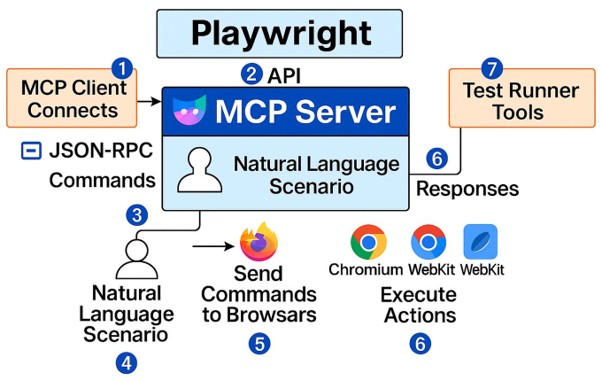
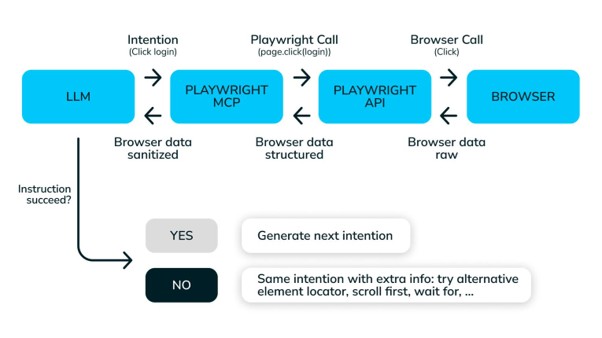
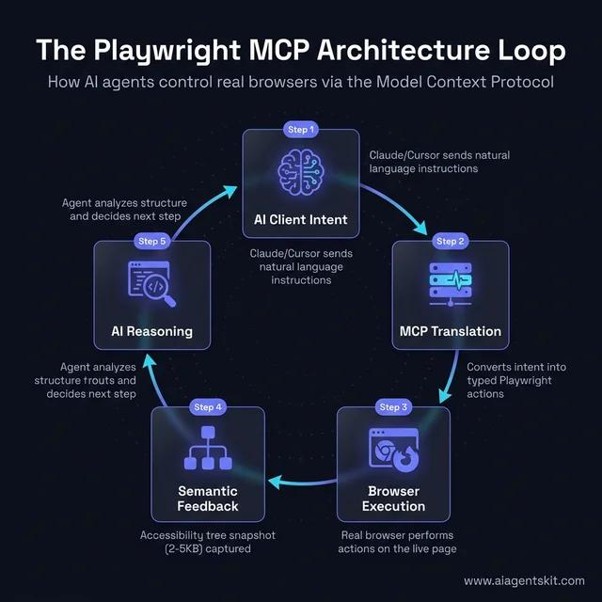
Basic architecture
AI Assistant / LLM
│
│ MCP requests
▼
┌─────────────────┐
│ MCP Server │
│ Playwright │
└────────┬────────┘
│
MCP Tools / Actions
│
▼
┌───────────────┐
│ Playwright │
│ Browser │
└───────┬───────┘
│
▼
Web Application
Example MCP tools
You could expose tools such as:
open_google
open_application
take_screenshot
find_element
click_element
fill_input
run_playwright_test
get_page_content
close_browser
Then an AI agent could receive:
“Open the application and verify that the login page is working.”
The agent could reason through the task and invoke tools exposed by your MCP server.
Simple MCP + Playwright server
Conceptually, your server can register a tool:
server.tool(
“open_google”,
“Open Google in Playwright”,
{},
async () => {
await page.goto(“https://www.google.com”);
return {
content: [
{
type: “text”,
text: “Google opened successfully”
}
]
};
}
);
The important distinction is:
MCP = communication/protocol layer
Playwright = browser automation layer
LLM/AI Agent = reasoning/orchestration layer
Where this becomes powerful
For example:
User
│
│ “Run the login test”
▼
AI Agent
│
▼
MCP Server
│
├── open_application()
├── inspect_page()
├── fill_username()
├── fill_password()
├── click_login()
├── screenshot()
└── verify_result()
│
▼
Playwright
│
▼
Browser
This is much more interesting than simply asking ChatGPT to generate:
test(“login”, async ({ page }) => {
…
});
The AI can potentially interact with the browser through tools.
MCP + Playwright + AI Agents
For an advanced Techtutorialz curriculum, I would present the progression like this:
Level 1 — Playwright
Tester → Playwright → Browser
Level 2 — AI-generated Playwright
Tester → LLM → Playwright Code → Browser
Level 3 — MCP + Playwright
AI → MCP Server → Playwright → Browser
Level 4 — AI Agent + MCP + Playwright
┌──────────────┐
│ AI Agent │
└──────┬───────┘
│
MCP protocol
│
┌──────▼───────┐
│ MCP Server │
└──────┬───────┘
│
Playwright tools
│
┌──────▼───────┐
│ Browser │
└──────────────┘
The agent can then use the available tools to accomplish a testing objective.


