
- Jul 14, 2026
- admin
- 0
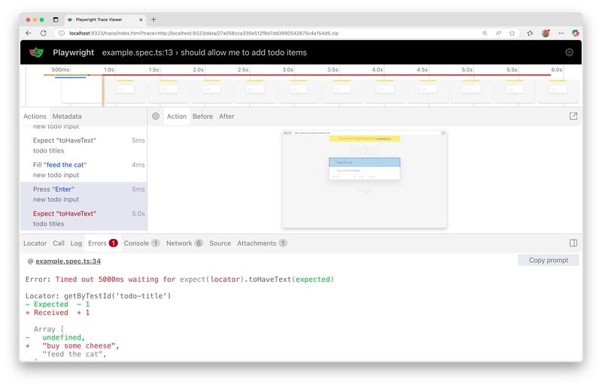
AI can be very useful for debugging failed and flaky Playwright tests, especially when combined with Playwright traces, screenshots, videos, console logs, network logs, and test results.
How AI can debug a failed Playwright test
A typical AI-assisted flow looks like this:
Playwright Test → Failure Artifacts → AI Analysis → Root Cause → Suggested Fix → Re-run
- Playwright captures the failure
- Error message
- Stack trace
- Screenshot
- Video
- Trace
- Console errors
- Network failures
- Test steps
- Browser/page information
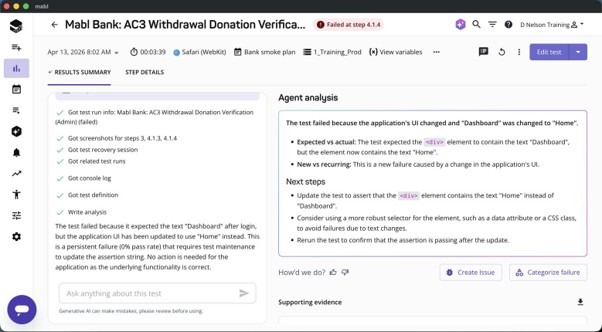
- AI analyzes the evidence
For example, instead of simply seeing:
TimeoutError: locator.click: Timeout 30000ms exceeded
AI can correlate the trace and DOM information and determine:
The locator was waiting for button.submit, but the application rendered the button with a different accessible role/name after the recent UI change.
- AI identifies the likely root cause
Common examples:
| Failure | AI can investigate |
| Locator timeout | Locator changed, element hidden, wrong selector |
| Element not clickable | Overlay, animation, loading state |
| Intermittent failure | Race condition, synchronization problem |
| API failure | 500/401/timeout/network issue |
| Assertion failure | Application data/state changed |
| Navigation failure | Slow page, redirect, network problem |
| Test passes locally but fails CI | Environment/resource/timing issue |
| Authentication failure | Expired storage state/session |
| Flaky test | Shared state, parallel execution, timing |
AI debugging flaky tests
This is where AI becomes particularly valuable.
Suppose your test fails 2 out of 20 CI runs.
AI can compare multiple executions:
Run #101 → PASS
Run #102 → PASS
Run #103 → FAIL
Run #104 → PASS
Run #105 → FAIL
It can compare:
- Trace files
- Timing
- Screenshots
- Network requests
- Console errors
- DOM state
- API responses
- Browser/environment
- Worker
- Retry results
and potentially identify:
Probable root cause: race condition.
The test clicks the Orders tab immediately after login, while the API request that populates the navigation menu is still pending. The test succeeds when the API responds quickly and fails when response time exceeds ~2 seconds.
That is much more useful than simply increasing:
timeout: 60000
AI can also suggest the Playwright fix
For example, instead of:
await page.locator(‘#orders’).click();
AI might recommend waiting for the application state rather than adding an arbitrary delay:
await expect(page.getByRole(‘link’, { name: ‘Orders’ })).toBeVisible();
await page.getByRole(‘link’, { name: ‘Orders’ }).click();
Or, when appropriate:
await page.waitForResponse(response =>
response.url().includes(‘/api/orders’) &&
response.status() === 200
);
The important principle is:
AI should diagnose the synchronization problem, not simply add waitForTimeout().
A powerful architecture for AI + Playwright
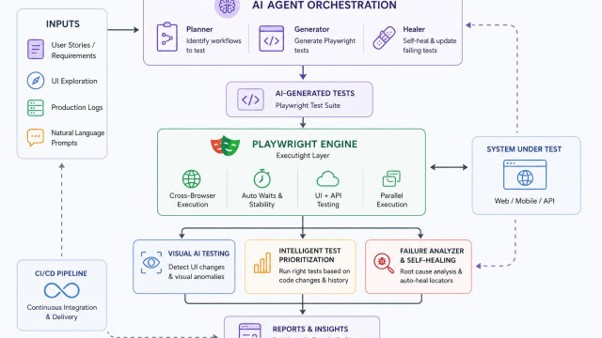
You can build an architecture like:
PLAYWRIGHT TEST
│
▼
┌─────────────────┐
│ Test Execution │
└────────┬────────┘
│
┌────────────┼────────────┐
▼ ▼ ▼
Screenshot Trace Logs
│ │ │
└────────────┼────────────┘
▼
┌───────────┐
│ AI │
│ Analyzer │
└─────┬─────┘
│
┌────────┴────────┐
▼ ▼
Root Cause Flaky Pattern
│ │
└────────┬────────┘
▼
Suggested Fix
│
▼
Re-run Test
Where MCP becomes interesting
Since you’re working with Playwright + AI + MCP, you can take this one step further.
An MCP server can expose Playwright capabilities to an AI agent:
AI Agent
│
▼
MCP Server
│
├── Run Playwright test
├── Read test result
├── Inspect trace
├── Take screenshot
├── Inspect page
├── Read console errors
├── Inspect network
└── Re-run test
Then you could ask:
“Why did login.spec.ts fail?”
The AI agent could:
- Run the test.
- Detect failure.
- Examine the error.
- Inspect the Playwright trace.
- Analyze screenshot/DOM.
- Check console/network errors.
- Determine probable root cause.
- Suggest a code change.
- Re-run the test.
- Report whether the failure is fixed.
That’s moving from AI-assisted testing toward AI-agentic test debugging.
A very important distinction
AI should not automatically assume every failure is a flaky test.
A good AI debugging system should classify failures as:
- Product defect
Application behavior is incorrect
- Automation defect
Test/locator/assertion is incorrect
- Environment defect
CI/server/network/database problem
- Flaky test
Same test alternates between PASS and FAIL
This classification is one of the strongest use cases for AI in Playwright.


